Path Planner
Path Planning Algorithm Analysis (C++ & Raylib) Link to heading
A comparative study of deterministic and stochastic pathfinding algorithms in static and dynamic grid environments. This project visualizes and benchmarks BFS, DFS, A*, and a Genetic Algorithm (GA) using a custom C++ engine built with Raylib.
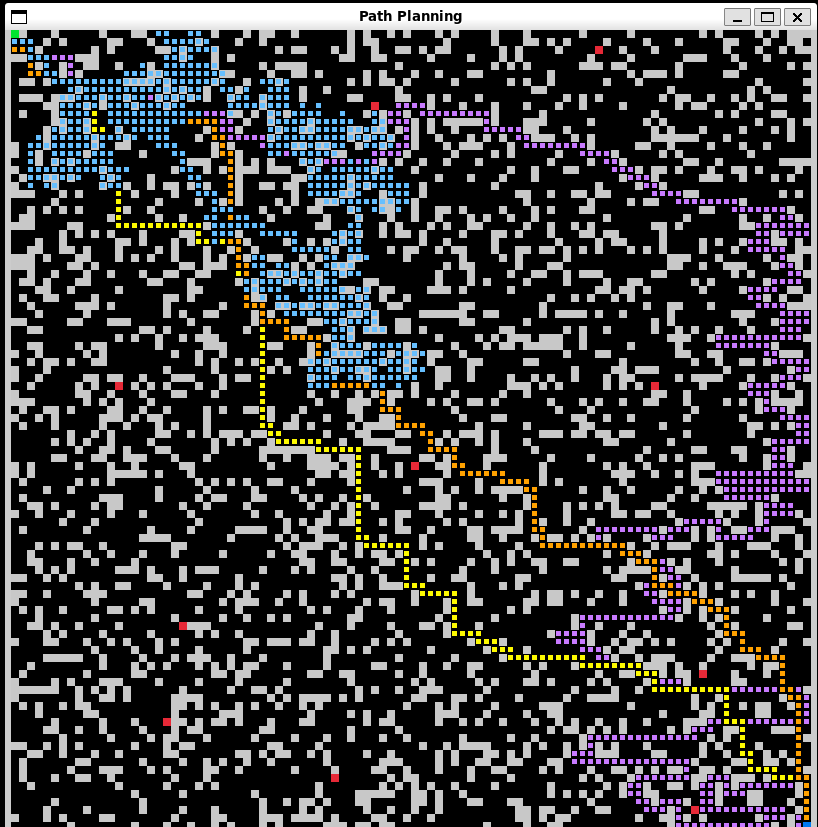
Visual comparison: A (Orange) & BFS (Yellow) find the optimal path, while DFS (Purple) explores inefficiently and GA (Blue) struggles with local optima.*
Features Link to heading
- Real-time Visualization: Built with Raylib for high-performance rendering.
- 4 Algorithms Implemented:
- Breadth-First Search (BFS): Guarantees shortest path (Benchmark).
- Depth-First Search (DFS): Memory efficient but non-optimal.
- A* Search (A-Star): Optimized heuristic search (Manhattan Distance).
- Genetic Algorithm (GA): Evolutionary approach with crossover, mutation, and “wall-sliding” physics.
- Dynamic Environment:
- 100x100 Grid (10,000 nodes).
- Randomly generated static mazes.
- Dynamic moving obstacles (Patrol bots).
- Data Logging: Automatically exports performance metrics (Time, Path Length, Nodes Visited) to CSV.
- Python Analytics: Includes a script to generate IEEE-style convergence and comparison graphs.
Installation & Build Link to heading
Prerequisites Link to heading
- C++ Compiler: G++ (MinGW for Windows, or native GCC for Linux/macOS).
- Raylib: Must be installed and linked.
- Python 3.x: (Optional) Required only for generating graphs.
- Python Libs:
pandas,matplotlib,seaborn.
Compiling Link to heading
Linux/macOS:
g++ main.cpp bfs.cpp dfs.cpp astar.cpp ga.cpp -o path_planner -lraylib -lGL -lm -lpthread -ldl -lrt -lX11
Windows (MinGW):
g++ main.cpp bfs.cpp dfs.cpp astar.cpp ga.cpp -o path_planner.exe -O2 -lraylib -lopengl32 -lgdi32 -lwinmm
Usage Link to heading
Run the Simulation:
Bash
./path_plannerThe window will open, generating a map and running all 4 algorithms sequentially.
Note: The Genetic Algorithm may take several seconds (or minutes) depending on parameters.
Results are saved to
experiment_data.csv.
Generate Graphs:
Bash
python3 plot_graphs.py- This generates
comparison_bar.pngandconvergence_graph.png.
- This generates
Configuration Link to heading
You can tune the algorithm parameters in ga.cpp and common.h:
C++
// ga.cpp - "Nuclear" Settings for Stress Testing
const int POPULATION_SIZE = 2000;
const int MAX_GENERATIONS = 1000;
const int CHROMOSOME_LEN = 5000;  // Path memory limit
const float MUTATION_RATE = 0.05f;
Results Summary Link to heading
| Algorithm | Avg Time (μs) | Path Length | Outcome |
|---|---|---|---|
| A* (A-Star) | 770 | 199 (Optimal) | Best |
| BFS | 1,667 | 199 (Optimal) | Accurate |
| DFS | 284 | 535 (Poor) | Fast but Dumb |
| Genetic Alg | 800,000,000+ | 4,879 (Trapped) | Failed |